
On October 1, 2026, Cloudflare introduced Clef and Clef-flash, decision models available through Workers AI, with model weights released under Apache 2.0. The interesting part for a small software team is a narrower job for AI: choosing among defined options rather than composing a reply.
The Clef documentation describes a request containing the material to evaluate, called state, and typed questions. The model returns probabilities for the allowed options. That makes a support-message classifier a plausible first experiment for a developer or automation builder. Connecting it to an inbox still requires an integration and an application policy. It does not make a correct-looking label permission to move, close or answer a ticket.
Here is an original five-check pilot plan for suggesting labels on routine product-support messages. It is a proposed evaluation, not a hands-on performance review. No model results, accuracy rates or time savings are claimed.
1. Define a small decision you can explain to another person
Start with a question such as: “Which of these routine queues best matches this message?” Keep the first trial separate from refunds, account-access decisions, security incidents and other consequential actions. The output should be a suggested queue name, not an instruction that the application blindly executes.
A toy label set could be:
- Setup question: the person wants to know how to use an existing feature
- Bug report: the person describes an existing feature failing or behaving unexpectedly
- Feature request: the person asks for a capability the product does not currently provide
- Needs review: the message mixes topics, lacks enough context or falls outside this scope
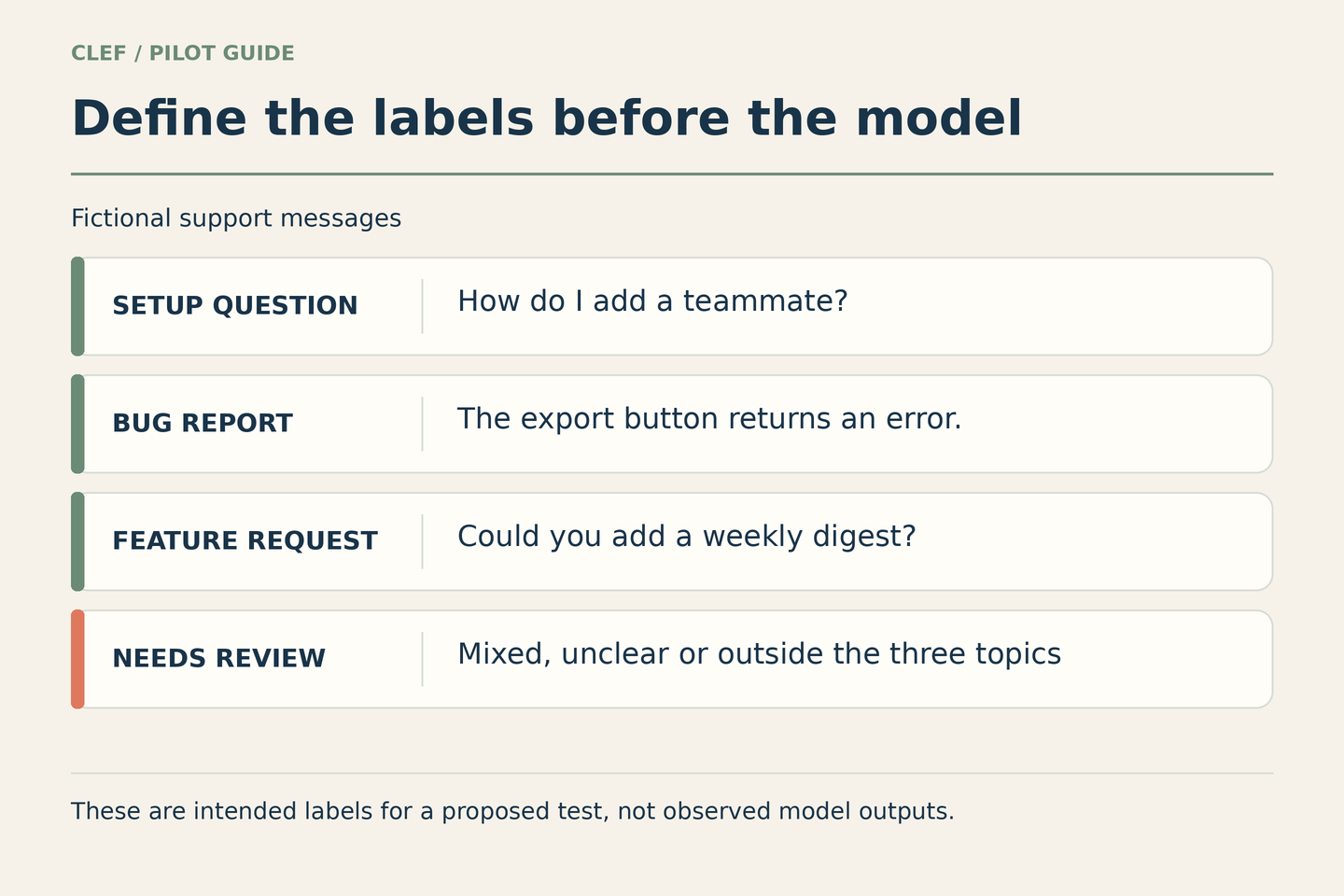
Write one clear example and one boundary example for each label. “Can you add a weekly digest?” is a straightforward feature request in this fictional product. “The digest stopped arriving; can you add an alert?” mixes a failure report with a feature request. Under this proposed policy, it belongs in review until a person decides how to split or prioritize it.
If two colleagues cannot agree on the intended label, fix the definition before adjusting the model. A classifier is an awkward place to hide an unresolved team policy.
2. Check what the model will actually receive
For the first dry run, use fictional messages. Move to real material only after confirming permission, necessary redaction and your organization's requirements for the chosen service. Keep the message text separate from the label definitions. Text inside a customer's message is input to classify, not authority to rewrite the routing policy.
There is a concrete implementation detail to watch: Cloudflare's parameter documentation says long state text is truncated to fit the token limit. An input can fit your database and still fail to reach the model intact. The documented context window is not a promise that an arbitrarily long conversation will be read.
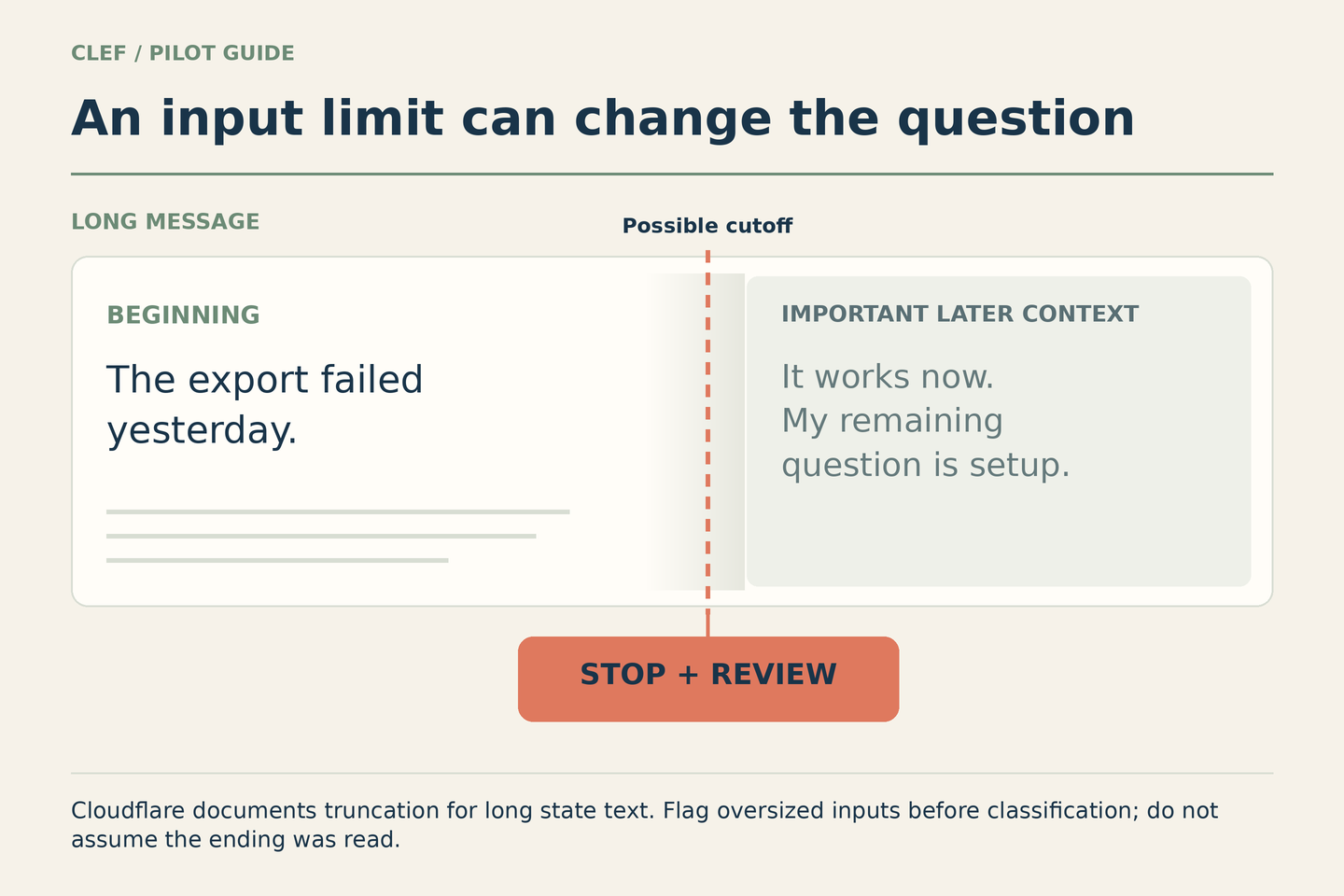
In the fictional example above, the beginning describes a broken export, while a later update says the problem is resolved and asks about setup. Losing the later context could change the intended classification. The illustration shows a risk to test, not an observed Clef failure or a claim about which end its service removes.
Have the application flag oversized, empty or unsupported inputs for manual handling before calling the model. Record the version of the extraction or redaction step as well as the model input length. If you shorten a conversation, verify that the remaining text still represents the question you want answered.
3. Build a test set that includes awkward messages
A pile of obvious examples can make almost any demo look tidy. Build a small development set to refine definitions, then keep a separate evaluation set that you do not use for those refinements. Give every example an intended label and a short explanation before looking at predictions.
| Message type | What the test should establish |
|---|---|
| A clear example of each normal label | The basic distinctions make sense |
| Two requests in one message | Your mixed-topic policy is applied, including review when needed |
| A topic outside the defined queues | The system does not force an unrelated request into a convenient label |
| A message that says “ignore the labels” | Customer text is not treated as a change to the application's policy |
| A long conversation with a later correction | Input handling preserves the relevant context or flags the case |
| An empty or malformed input | The application uses its fallback instead of treating failure as a valid suggestion |
These are test categories, not claims that Clef passes them. Add the languages and formats your real inbox uses. Include ordinary cases in realistic proportions, but keep an explicitly labeled set of difficult cases so a good overall average cannot hide a recurring failure.
Compare the proposal with your current routing process and any simple rules that already work. A new model is useful only if the complete process becomes worthwhile after review, exceptions and maintenance.
4. Put an application policy between probabilities and actions
A returned probability is a model estimate. It is not an independent certificate that the selected label is correct for your inbox. Do not pick a universal confidence cutoff because a round number looks reassuring.
Instead, inspect mistakes by label and message type. Consider what each mistake costs: a feature suggestion landing in a setup queue may be easy to correct; a request requiring specialist attention must not disappear into an unattended queue. Use enough independent examples to judge whether score ranges correspond to acceptable outcomes, and keep human review where the evidence is thin.
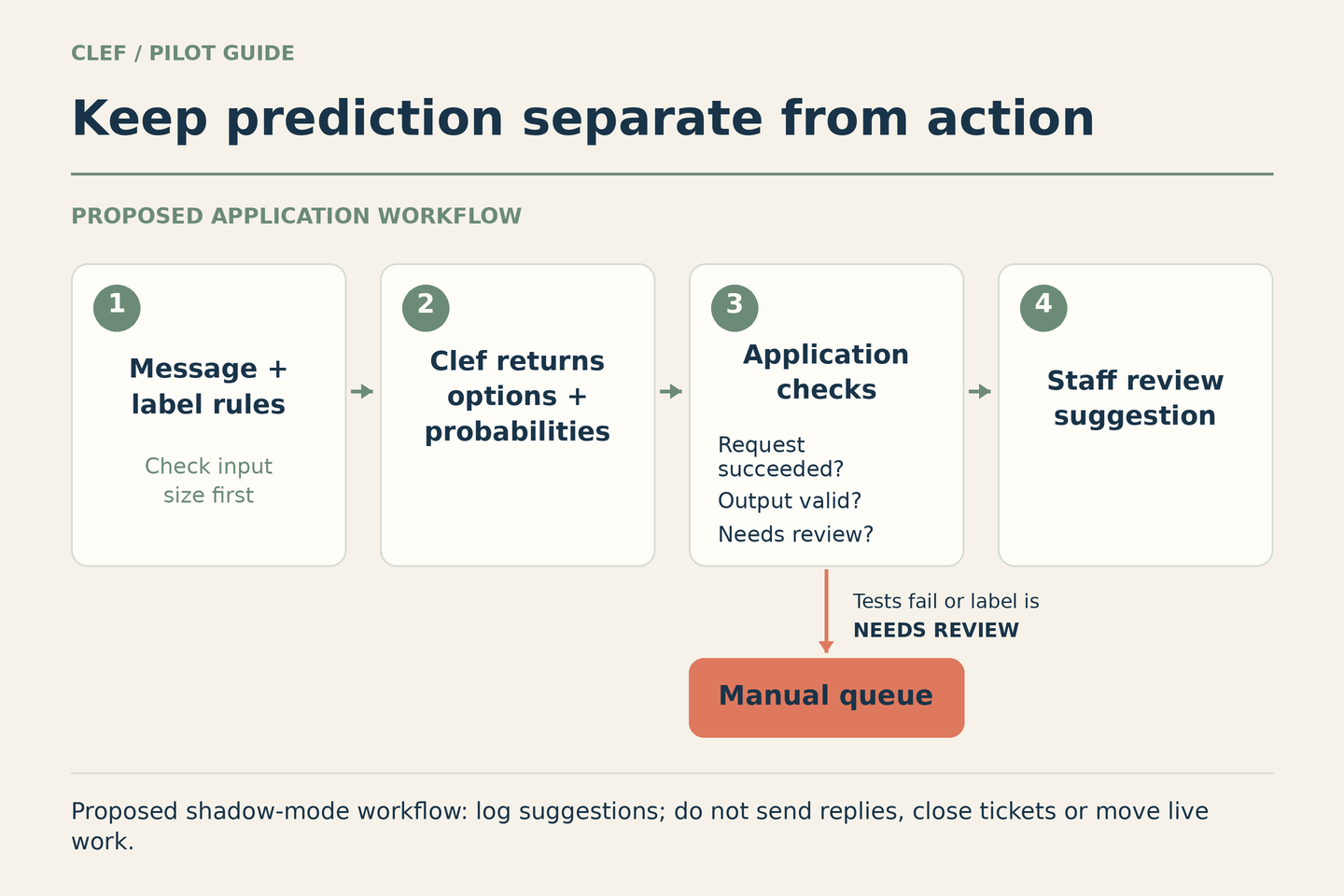
The model's Needs review option and the application's manual fallback are different safeguards. A model can fail to select the review option. Your application still needs to handle invalid responses, missing fields, timeouts, unsuitable inputs and any policy that requires a person.
For the first trial, write the suggestion to an evaluation log without changing the ticket's live queue. Keep the original message, predicted label, returned probabilities, intended label and reviewer's correction together, subject to your data-handling rules. Do not give this prototype permission to send replies, close tickets or perform account changes.
5. Try shadow mode before staff-facing suggestions
In shadow mode, the proposed classifier runs alongside the existing process while people continue handling the work normally. Compare its suggestions with reviewed outcomes. This lets you examine routing quality and operational failures without making the new system responsible for the inbox.
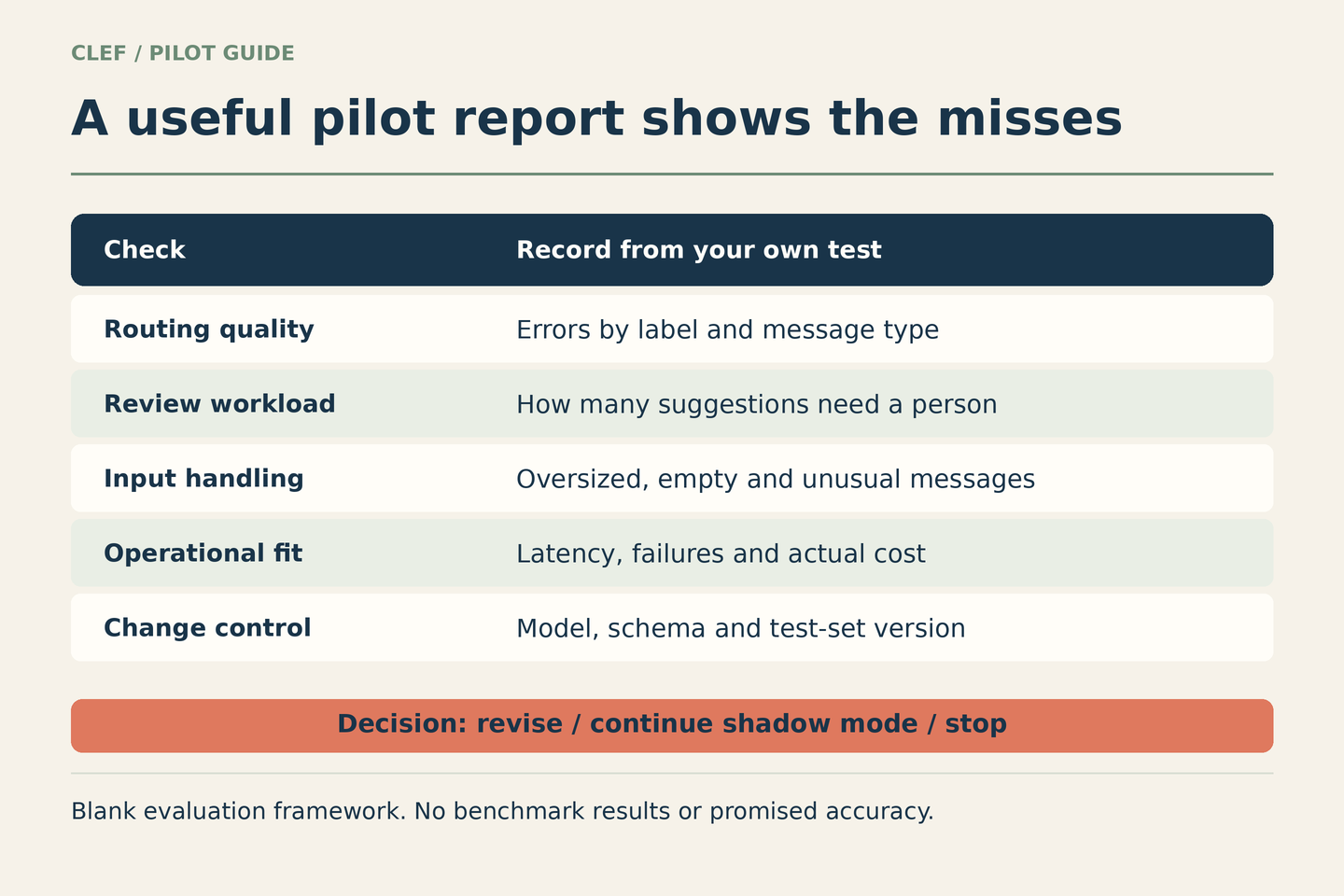
Record errors by label, review workload, input-handling failures, end-to-end latency and actual cost. Include retries and the human effort needed to check mistakes. Cloudflare publishes Workers AI pricing and usage limits; check the current model and account terms and set a small trial budget before running requests. Public model weights do not make hosted inference or local operation costless.
Keep the model identifier, label definitions, input-processing version and evaluation-set version in the report. If any of them changes, rerun the checks. A successful test of yesterday's definitions does not validate today's larger menu of labels.
- Revise: normal categories overlap, the same message type repeatedly goes wrong, or too much context is lost
- Continue shadow mode: the initial results look useful, but uncommon cases or operational costs remain unclear
- Consider staff-facing suggestions: a reviewer can inspect and correct them, and the evidence meets the requirements you set in advance
- Stop: the extra checking and exceptions outweigh the benefit, or the data cannot be used appropriately
Autonomous routing is a separate decision requiring stronger evidence, monitoring and a way to return to the previous process. Clef's release makes bounded classification worth examining. The useful first deliverable is a small, reviewable evaluation report, not a triumphant “AI now owns the inbox” announcement.